Family tattoo ideasConnections to express in your own way.
Explore family tattoos with trees, bouquets, hands, names and small branches. Build a design for several loved ones or choose matching motifs to share between adults.
More about this selection
If you want several names, prepare the exact list and a readable hierarchy. Your artist can compare separate lines, a branch with small markers or a circular layout. Avoid shrinking every detail just to fit more names.
Family tattoo ideas on skin
Light, medium and dark skin tones, different proportions and placements: compare how each motif sits on the body. These images are simulations created with our AI.
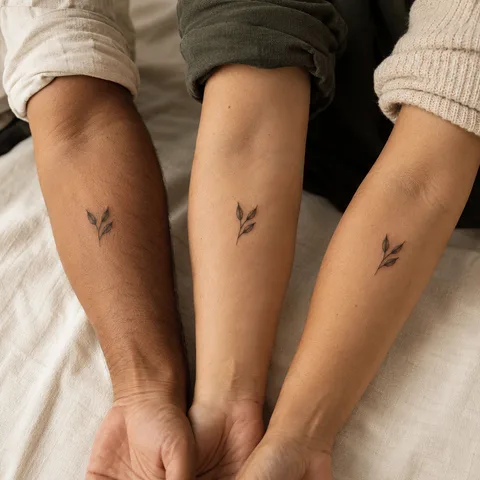
Three shared branches
Three small sprigs suggest a family connection. The number of leaves can become a personal detail to agree together.
PersonaliseA date and a flower
08.05.2020 paired with a rose. The flower and inscription remain distinct and easy to read.
PersonaliseLéa and a flower
The name Léa extends a flower. Check the accent, reading direction and connection between stem and letters.
PersonaliseMore designs to explore
Try another direction: start with a line, a silhouette or a colour, then adapt the design in the studio.
A tree of life with visible roots inside a circle
PersonaliseThree tiny birth flowers (daisy
PersonaliseOne adult mother hand gently holding one child hand
PersonaliseTwo birds perched close together on one short branch
PersonaliseThe words "Toujours avec moi" in fine handwriting across two lines
PersonaliseOne small simple daisy above exact date 08.05.2020 in clear thin black numerals. Airy tiny commemorative composition.
PersonaliseTurn a reference into your own project
Decide who and what you want to evoke: a group of people, a gathering place, a tradition or a memory. One motif can represent a family without assigning a letter or symbol to every person.
If you want several names, prepare the exact list and a readable hierarchy. Your artist can compare separate lines, a branch with small markers or a circular layout. Avoid shrinking every detail just to fit more names.
Explore tattoo meanings →Three directions to compare
The main outline
Start with the outer shape. Choose what you want to keep before adding lettering or secondary elements.
Explore this direction →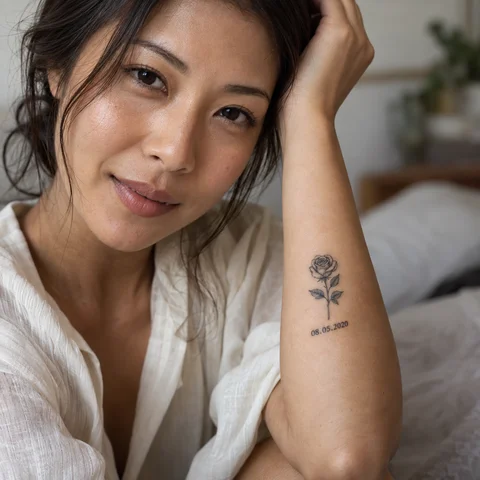
The contrast
Compare the dark lines with the open spaces. Ask your artist which details suit your intended size.
Explore this direction →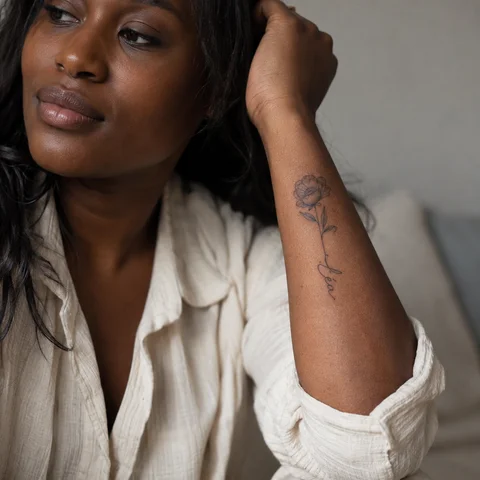
The placement
Look at the same reference at its actual size and from several angles. The placement is part of the composition.
Explore this direction →Where should your tattoo go?
Forearm
A branch, bouquet or inscription can follow a line. Set its length before multiplying elements.
Upper arm
A rounded composition can frame a tree or group of motifs with clear space between them.
A design for two
Relationship galleries offer matching and complementary ideas.
Represent several people without crowding the design
A tree and its roots
Begin with the silhouette. Roots can suggest your history without assigning universal meanings to every branch.
A flower bouquet
Choose flowers connected to your memories. Birth flower lists vary, so agree on the reference you want to use.
Names or initials
Check order, spelling and repeated letters. Two people sharing an initial can be distinguished through spacing or a small detail.
Prepare your reference for the artist
Keep two or three references and note exactly what you want to retain from each. Specify placement, approximate dimensions and any existing tattoos nearby.
If the design includes letters or a date, prepare the exact text separately. AI images are starting points for discussion, not validated stencils or predictions of the final result.
More directions for your project
From the first design to your appointment
Clarify your reference
Keep a few images and explain what you like about each: the subject, linework, scale or placement. A reference starts a conversation; it is not a finished stencil.
Choose an artist for the style
Look at the artist’s own work, including healed examples where available. Discuss the intended dimensions, placement and any text before requesting a quote.
Check the final drawing
Review the stencil at its actual size and in several natural positions. Read names and dates character by character before approving them.
Prepare the appointment and aftercare
Ask your tattoo artist for preparation and aftercare instructions tailored to the session. The images here cannot determine what is suitable for your individual skin.
What if your next tattoo
started with your words?
Choose a direction, change a detail and create your own reference with Encre Vive.
Create my tattooView plans and creditsYour questions answered
01Which symbol represents family?
A tree, flower, circle or familiar object are possible starting points. None has one compulsory meaning; choose what fits your story.
02Can I plan future additions?
Tell your artist from the start. They may reserve space or suggest an expandable structure; not every motif extends equally well.
03Do I have to include every name?
No. A single image, phrase or place can represent the family without an inscription.
04How do I personalise a reference?
Choose a model to open the generator with its subject and style. Change the description before generating and check any letters or numbers in the result.
05Are the tattoos in the photographs real?
The photographs are AI-generated simulations. Lettering studies show example layouts; all references need adapting with a tattoo artist.
06How much should I budget?
Ask an artist for a quote based on the dimensions, placement and detail of your project. The gallery cannot determine the cost of your session.