Initial tattoo ideasA few letters, a considered composition.
Compare one letter, separate initials and monogram layouts for a tattoo. The A and M lettering studies are examples to replace with your own letters; name and date photos help compare placements.
More about this selection
Spacing matters as much as letter shape. Overlapping strokes may accidentally create another character. Compare plain and decorated versions at actual size, then ask your artist to redraw the final lettering.
Initial tattoo ideas on skin
Light, medium and dark skin tones, different proportions and placements: compare how each motif sits on the body. These images are simulations created with our AI.
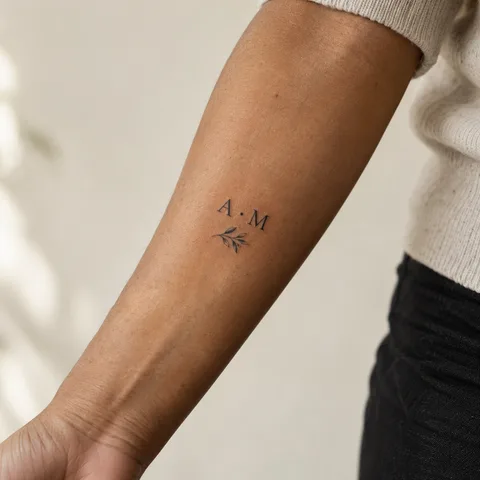
A and M, spaced initials
Two capitals separated by a dot with a small sprig. Replace these example letters with your own initials.
PersonaliseEmma at the wrist
Emma and a small heart offer a short-lettering reference to compare with a floral composition.
PersonaliseA date, a memory
The date 12.06.1994 uses spaced numerals. Choose the date format and separators before the drawing.
PersonaliseMore designs to explore
Try another direction: start with a line, a silhouette or a colour, then adapt the design in the studio.
The initials A and M in serif capitals
PersonaliseThe initials A and M in sans-serif capitals with a central gap
PersonaliseThe initials A and M on two lines
PersonaliseThe spaced initials A and M inside a fine circle
PersonaliseThe initials A and M with the date 12.04.2019 on a second line
PersonaliseTwo separate letters A and M
PersonaliseTurn a reference into your own project
Prepare the exact letters and their order before considering decoration. Separate capitals, a monogram and a handwritten initial read differently. Decide how to handle people who share the same initial.
Spacing matters as much as letter shape. Overlapping strokes may accidentally create another character. Compare plain and decorated versions at actual size, then ask your artist to redraw the final lettering.
Explore tattoo meanings →Three directions to compare
The main outline
Start with the outer shape. Choose what you want to keep before adding lettering or secondary elements.
Explore this direction →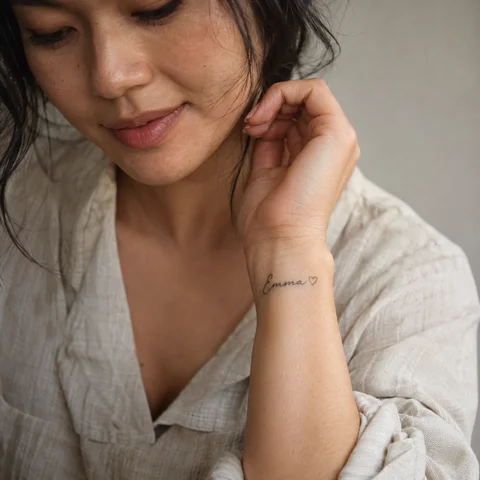
The contrast
Compare the dark lines with the open spaces. Ask your artist which details suit your intended size.
Explore this direction →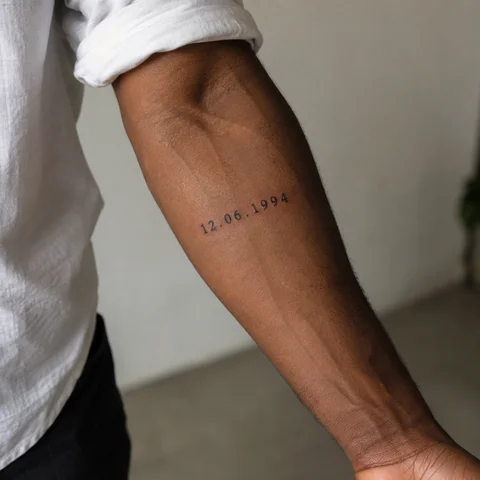
The placement
Look at the same reference at its actual size and from several angles. The placement is part of the composition.
Explore this direction →Where should your tattoo go?
Wrist
Two spaced letters can form a short line. Check them in your chosen reading direction.
Forearm
A vertical layout or accompanying date needs more length than one letter.
Compare lettering
Capitals, script and handwriting give the same letters different appearances.
Six lettering studies to adapt
Separate letters
A dot or gap clarifies the separation. Make sure it cannot be mistaken for another part of the name.
A vertical layout
Two lines can avoid compressing letters. Define their alignment and spacing with your artist.
A frame or date
A circle or date can structure the composition. Keep a margin around the letters rather than touching the frame.
Prepare your reference for the artist
Keep two or three references and note exactly what you want to retain from each. Specify placement, approximate dimensions and any existing tattoos nearby.
If the design includes letters or a date, prepare the exact text separately. AI images are starting points for discussion, not validated stencils or predictions of the final result.
More directions for your project
From the first design to your appointment
Clarify your reference
Keep a few images and explain what you like about each: the subject, linework, scale or placement. A reference starts a conversation; it is not a finished stencil.
Choose an artist for the style
Look at the artist’s own work, including healed examples where available. Discuss the intended dimensions, placement and any text before requesting a quote.
Check the final drawing
Review the stencil at its actual size and in several natural positions. Read names and dates character by character before approving them.
Prepare the appointment and aftercare
Ask your tattoo artist for preparation and aftercare instructions tailored to the session. The images here cannot determine what is suitable for your individual skin.
What if your next tattoo
started with your words?
Choose a direction, change a detail and create your own reference with Encre Vive.
Create my tattooView plans and creditsYour questions answered
01How do initials differ from a monogram?
Initials remain separate letters. A monogram combines or overlaps them into a mark; check that the characters stay recognisable.
02Does AI guarantee correct lettering?
No. It may change or distort characters despite an exact prompt. Treat studies as references and check the final drawing and stencil with your artist.
03Can I include several initials?
Yes, if each letter has enough space. Compare a line, a column and separate groups before choosing.
04How do I personalise a reference?
Choose a model to open the generator with its subject and style. Change the description before generating and check any letters or numbers in the result.
05Are the tattoos in the photographs real?
The photographs are AI-generated simulations. Lettering studies show example layouts; all references need adapting with a tattoo artist.
06How much should I budget?
Ask an artist for a quote based on the dimensions, placement and detail of your project. The gallery cannot determine the cost of your session.