Hand tattoo ideasA small surface with a strong presence.
Explore hand tattoo ideas with leaves, bold roses and compact stars. Compare simplified motifs and check their placement with the hand open and closed.
More about this selection
Consider the everyday visibility of the placement before choosing it. Ask an artist experienced with hand tattoos to assess the proposed area, the spacing and what follow-up the project may need.
Hand tattoo ideas on skin
Light, medium and dark skin tones, different proportions and placements: compare how each motif sits on the body. These images are simulations created with our AI.
Graphic rose
A strongly outlined rose sits in the centre of the hand, with distinct petals for a readable shape.
PersonaliseA discreet star
A star at the side of the hand, to compare with the hand both open and closed.
PersonaliseMore designs to explore
Try another direction: start with a line, a silhouette or a colour, then adapt the design in the studio.
Black wave with a curved outline and foam details
PersonaliseOne four-point north star
PersonaliseA diagonal olive branch
PersonaliseOne compact rose bloom without stem
PersonaliseOne simple solid black lightning bolt
PersonaliseOne very simple outline of two mountain peaks on short horizontal baseline
PersonaliseHand tattoo ideas: shaping your project
The hand changes shape constantly. A design should remain readable across the movement of the fingers and knuckles. Start with a clear silhouette instead of shrinking a highly detailed drawing.
Consider the everyday visibility of the placement before choosing it. Ask an artist experienced with hand tattoos to assess the proposed area, the spacing and what follow-up the project may need.
Explore tattoo meanings →Three directions to compare
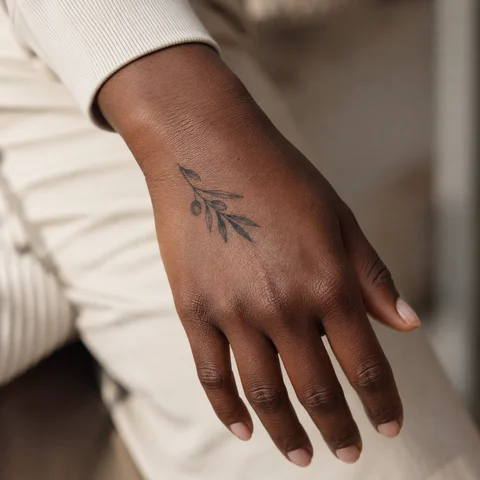
Fine line and open space
A fine outline brings attention to the silhouette and the skin around it. Start with a clear subject and agree on the scale and spacing with your artist.
Explore this direction →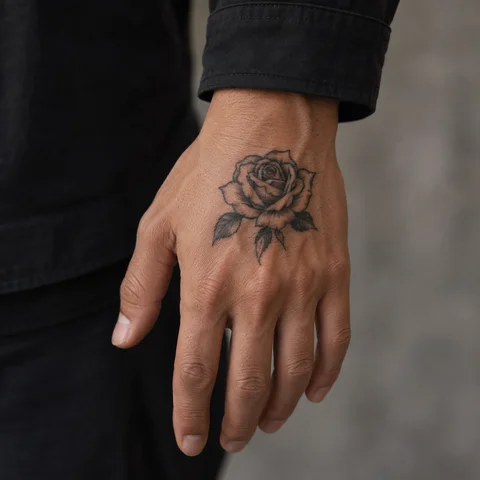
Graphic blackwork
Solid black and open areas build contrast. Check the silhouette from a distance before refining the smaller details.
Explore this direction →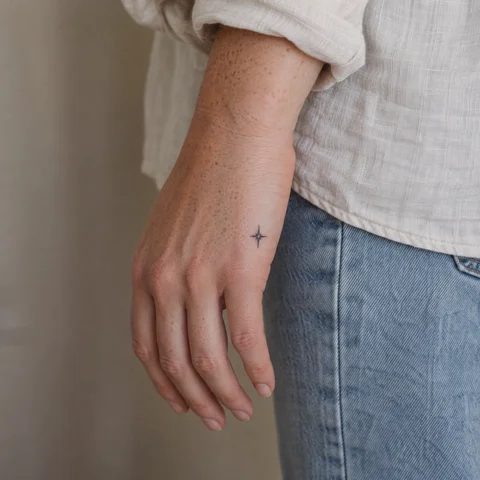
Minimalist shapes
A few lines can suggest an animal, landscape or symbol. Keep the essential outline and compare it at its actual size before adding detail.
Explore this direction →Where should your tattoo go?
Back of the hand
Compare the outline at its actual size on the back of the hand. Check both the main subject and the space around it.
Side of the hand
Look at the placement in a relaxed position and as you move. Discuss the direction and proportions before adding smaller details.
Towards the wrist
Decide how visible you want the tattoo to be with your everyday clothes. Keep any future additions in mind when defining its edges.
More directions for your project
From the first design to your appointment
Clarify your reference
Keep a few images and explain what you like about each: the subject, linework, scale or placement. A reference starts a conversation; it is not a finished stencil.
Choose an artist for the style
Look at the artist’s own work, including healed examples where available. Discuss the intended dimensions, placement and any text before requesting a quote.
Check the final drawing
Review the stencil at its actual size and in several natural positions. Read names and dates character by character before approving them.
Prepare the appointment and aftercare
Ask your tattoo artist for preparation and aftercare instructions tailored to the session. The images here cannot determine what is suitable for your individual skin.
What if your next tattoo
started with your words?
Choose a direction, change a detail and create your own reference with Encre Vive.
Create my tattooView plans and creditsYour questions answered
01Can I copy an arm design onto my hand?
The proportions usually need adapting. Choose the essential shapes, check movement and discuss the specific placement with an experienced artist before approving a stencil.
02How much will this tattoo cost?
Size, detail, placement and the artist’s work determine the quote. Bring your references and intended dimensions: an image alone cannot give a reliable price.
03How can I personalise these designs?
Choose a reference to open the studio, then change its description and style. Replace example names and dates with your own information and verify every character.
04Are these photographs of real tattoos?
These are original simulations generated with our AI. Use them to compare ideas and placements, then prepare the final drawing and its adaptation to your skin with a tattoo artist.