Butterfly tattoo ideas: wings, colour and small motifsAn outline with its own movement.
Explore butterflies in fine line, solid black, colour and floral compositions. Compare open wings, internal spacing and placements on the arm, calf or nape before personalising a design.
More about this selection
A butterfly can accompany a personal milestone, recall a garden or simply appeal to you visually. A flower adds another focal point. This selection also includes a moth: compare the body, antennae and wings before choosing your insect.
Butterfly tattoo ideas: wings, colour and small motifs on skin
Light, medium and dark skin tones, different proportions and placements: compare how each motif sits on the body. These images are simulations created with our AI.
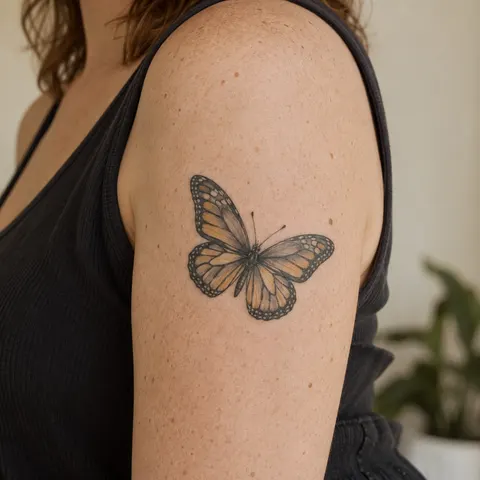
Black and ochre butterfly
Black outlines separate ochre accents and light spaces within the wings.
PersonaliseIllustrated butterfly
A butterfly with teal and ochre accents uses symmetry to create a clear centre on the calf.
PersonaliseButterfly at the nape
A butterfly centred at the nape, with space around the wings as important as the lines.
PersonaliseMore designs to explore
Try another direction: start with a line, a silhouette or a colour, then adapt the design in the studio.
An open-winged butterfly in fine black linework
PersonaliseA butterfly with black wings opened by white spaces
PersonaliseA butterfly with spread wings
PersonaliseTwo small butterflies around a daisy stem
PersonaliseA symmetrical butterfly with geometric faceted wings
PersonaliseA death's-head hawkmoth
PersonaliseTurn a reference into your own project
Start with the position of the wings. Open wings create a broad, centred composition; a side view creates a narrower movement. If you have a particular species in mind, bring a photograph and identify the outlines or colours you want to retain.
A butterfly can accompany a personal milestone, recall a garden or simply appeal to you visually. A flower adds another focal point. This selection also includes a moth: compare the body, antennae and wings before choosing your insect.
Explore tattoo meanings →Three directions to compare
The main outline
Start with the outer shape. Choose what you want to keep before adding lettering or secondary elements.
Explore this direction →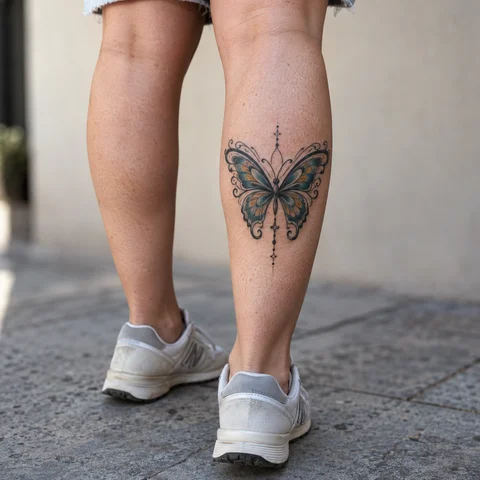
The contrast
Compare the dark lines with the open spaces. Ask your artist which details suit your intended size.
Explore this direction →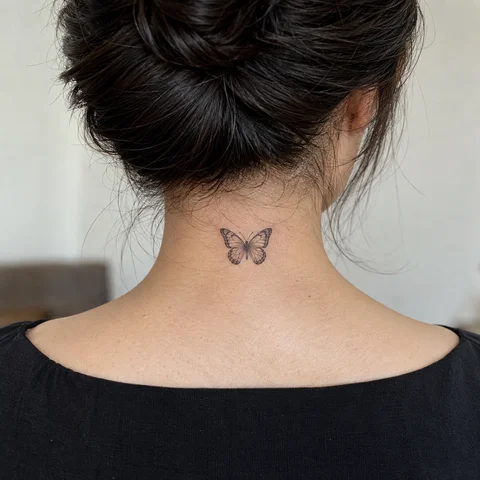
The placement
Look at the same reference at its actual size and from several angles. The placement is part of the composition.
Explore this direction →Where should your tattoo go?
Upper arm
Open wings can follow the volume. Check that both wings remain readable from the side.
Calf
An isolated butterfly creates a centre; a floral stem can extend the composition downwards.
Nape
Compare the wingspan with the area left visible by your hairstyle.
Compare the wings before adding ornaments
Fine line
Leave space between the veins. The outline and main divisions may be enough to identify the shape.
Solid black
Uninked spaces open up the drawing. Compare filled wings with a more open version.
A botanical pairing
A flower or two smaller butterflies creates movement. Avoid giving every detail equal visual weight.
Prepare your reference for the artist
Keep two or three references and note exactly what you want to retain from each. Specify placement, approximate dimensions and any existing tattoos nearby.
If the design includes letters or a date, prepare the exact text separately. AI images are starting points for discussion, not validated stencils or predictions of the final result.
More directions for your project
From the first design to your appointment
Clarify your reference
Keep a few images and explain what you like about each: the subject, linework, scale or placement. A reference starts a conversation; it is not a finished stencil.
Choose an artist for the style
Look at the artist’s own work, including healed examples where available. Discuss the intended dimensions, placement and any text before requesting a quote.
Check the final drawing
Review the stencil at its actual size and in several natural positions. Read names and dates character by character before approving them.
Prepare the appointment and aftercare
Ask your tattoo artist for preparation and aftercare instructions tailored to the session. The images here cannot determine what is suitable for your individual skin.
What if your next tattoo
started with your words?
Choose a direction, change a detail and create your own reference with Encre Vive.
Create my tattooView plans and creditsYour questions answered
01Must a butterfly be perfectly symmetrical?
A front view can be symmetrical; a side view or moving pose need not be. Choose the orientation first.
02Can a tiny butterfly contain lots of detail?
Size limits readable veins and textures. Compare a simplified outline before reducing a complex drawing.
03Butterfly or moth?
They offer different silhouettes. Show your artist a reference of the insect you want, especially if its antennae, body or wing markings matter to you.
04How do I personalise a reference?
Choose a model to open the generator with its subject and style. Change the description before generating and check any letters or numbers in the result.
05Are the tattoos in the photographs real?
The photographs are AI-generated simulations. Lettering studies show example layouts; all references need adapting with a tattoo artist.
06How much should I budget?
Ask an artist for a quote based on the dimensions, placement and detail of your project. The gallery cannot determine the cost of your session.